Reverse Outlining Your 2nd+ Draft

You've got a complete draft, you've done a small celebratory dance, and even gotten feedback from readers. It's all coming together!
Now what?
If you're a little (or a lot lost), a reverse outline may be where you need to start. Instead of blocking out what you intend to write, this is all about taking an objective look at what you did write.
The idea of the reverse outline frequently gets explained as a tool for essay writing but, as Marc Greenwald argues, fiction authors can also benefit from the practice.
What it looks like for screenwriting
Start from FADE IN: and work your way forward:
Summarize - Depending on whether your next draft is a structural rewrite or a polish, you might want different levels of focus. You might summarize by sequence, by scene, or by beats within a scene.
These summarize can answer some important questions for you:
- What happens, and what do the characters do?
- What is the short term goal the protagonist works toward in this particular scene?
- How does the scene's goal relate to the overall goal of the story?
Throughline - In this part of your script, what story does this moment advance? Is it part of the protagonist's journey? Does it follow a supporting character's subplot? If this a TV/episodic script, is this moment part of the A plot, B plot, etc.?
Labelling these shows the pacing of the different narrative tracks in the story.
Seeing these labeled helps you to gauge:
- How long is there between each of the moments you touch on a subplot?
- Are there characters that disappear for extended periods of time or don't pull their weight in the story?
- Is the main story you're prioritizing connected to the sub-plots and/or smaller stories?
Follow the ____ - Tag these things for reference so you can easily answer "Where are we?" questions at a glance.
This can help track:
- Is there a central theme to your script that plays out specifically in certain scenes?
- Is there a MacGuffin that the audience needs to keep track of?
- Are you checking to make sure a character's movement through different parts of the story doesn't create plot holes?
- Is there a relationship developing throughout the script? Do its beats make sense in their current order and timing?
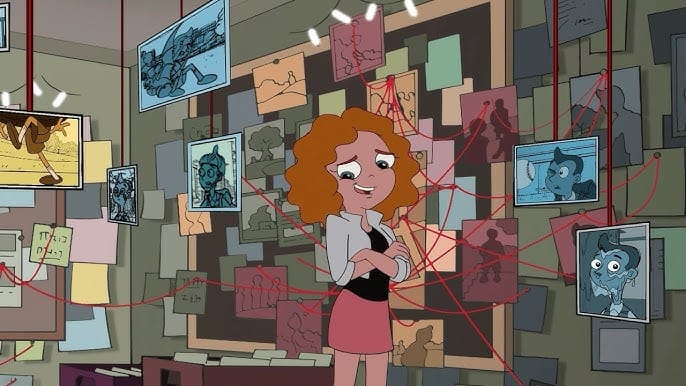
Does it all connect?
You are always writing two scripts: The one on the page, and the one in your mind.
An exercise like the reverse outline isn't just a starting point for a new draft, but a gut check on the difference between your idea and its execution.
How to Reverse Outline in Highland Pro
When you're writing in Highland Pro, there are outlining tools you can use either in-between your writing or as a separate document.
= synopsis
Typing the = sign before text marks a synopsis section. For a reverse outline, putting this below a scene heading will let you immediately see what the scene is about and how it functions in the larger story.
[[notes]]
Typing [[double brackets]] around text, or using the keyboard shortcut ⌘ Command + / sets up a note within your document. You can add these anywhere you want to remind yourself of something you want to address later, or labelling which throughline a scene or dramatic beat connects to.
{{%m: markers}}
Markers are a way to tag a sequence of moments within your document. You can insert a marker with the keyboard shortcut ^ Control + m, selecting Tools > Markers > Insert Marker from the menu bar, or typing out the curly-bracketed syntax {{%m}}
You can jump forward from one marker to the next with the keyboard shortcut ^ Control + ⇧ Shift + m or move back to the previous marker with ^ Control + ⌥ Option + m, letting you quickly move around your document and follow a series of connected sections rapidly.
And if you want to clearly identify what you're following with markers, add a tag like this:
{{%m: MacGuffin}}
Navigating your reverse outline
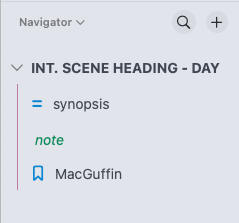
Highland Pro's left-hand sidebar (The Navigator) nests highlighting elements underneath scene headings, giving you a bullet point reference for your entire script.
And here's how Highland Pro can launch you into your next draft. After doing your reverse outline inside your recent draft, click the Share button on the bottom of The Navigator, and up pops a new document that strips out all the action lines and dialogue but keeps all of your outlining elements!
Put it in reverse!
The reverse outline - It's a way to bring together feedback, double-check that necessary parts are in place, and give yourself the opportunity to analyze your own writing as if it wasn't your own work.
If you don't know how to get started on your next draft, or your current draft feels like a smorgasbord of scenes seeking a clear vision, the reverse outline may be the tactic you need!