How to Write a Montage in a Screenplay

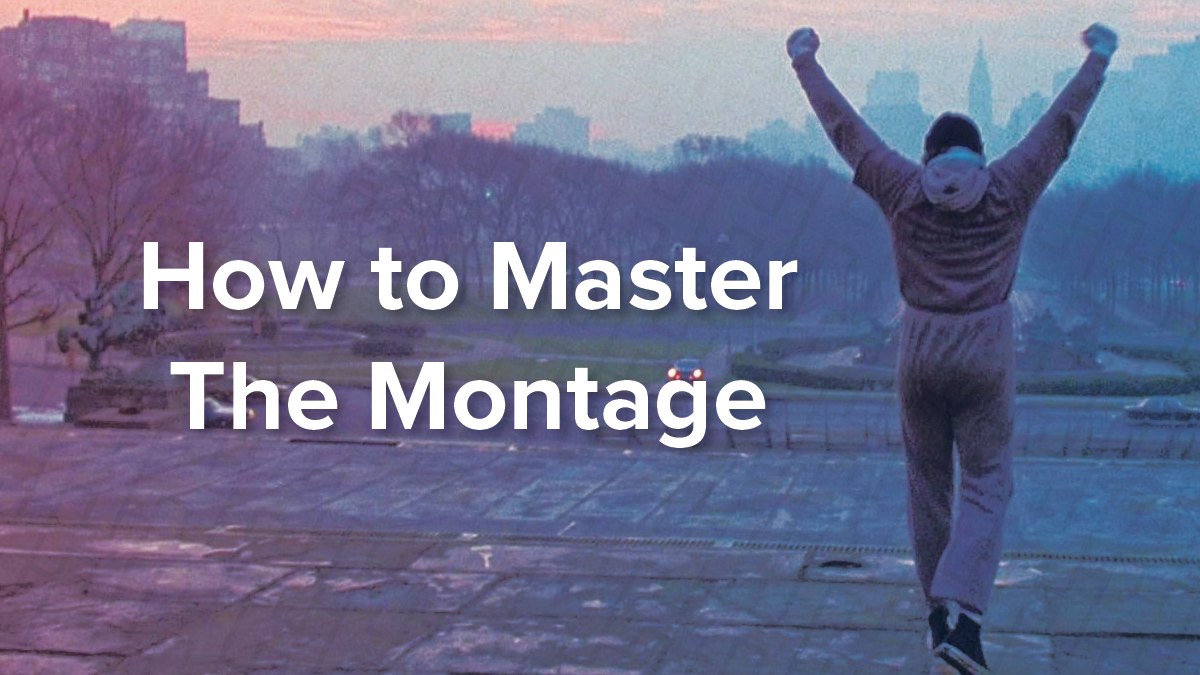
A montage is one of cinema’s most powerful storytelling tools: a rapid sequence of images that compresses time, builds emotion, or shows a character’s transformation. In French, the word montage is used for the position of the Editor. It is that semantically fundamental to the craft of making films.
There is no single hard and fast rule for how to format a montage in a screenplay. As with all formatting, the goal is to express what’s happening on screen as clearly and simply as possible without slowing down the narrative momentum.
The following are a few standard montage formatting options. Any of them are an acceptable starting point for your own script, just try to remain consistent within a screenplay. You may also find that none of these suit your needs entirely so you may need to blend styles or create something unique to your screenplay. If you need more examples or inspiration, we always recommend reading produced screenplays to help find a practical, real-world answer.
- What's the Difference Between a Montage and a Series of Scenes?
- Montage in a Single Location
- Montage in a New Location
- Montage in Multiple Locations
- When Should You Use a Montage in Your Screenplay?
- Frequently Asked Questions
What's the Difference Between Montage vs. a Series of Scenes?
Before diving into montage formatting, it's worth clarifying the difference between a montage and a series of scenes, since writers frequently use the terms interchangeably when they mean different things on the page.
A montage compresses time through a sequence of short, often wordless moments that are thematically or emotionally linked. Think of a training sequence, a falling-in-love sequence, a passage of time. The individual beats are brief and don't require their own full scene headings.
A series of scenes is similar in structure but typically involves more specific action in each beat, often with dialogue, and each element usually gets its own proper scene heading. If your sequence has characters talking to each other or making meaningful decisions in each beat, you're probably writing a series of scenes rather than a montage. Think of any heist movie you've ever seen like Ocean's Eleven, the planning of the heist montage often drops into little scenelets held together by an overarching monologue.
In practice, the line between the two is blurry and many professional screenwriters use both terms loosely. When in doubt, use whichever label most clearly communicates the intended pace and feel to your reader.
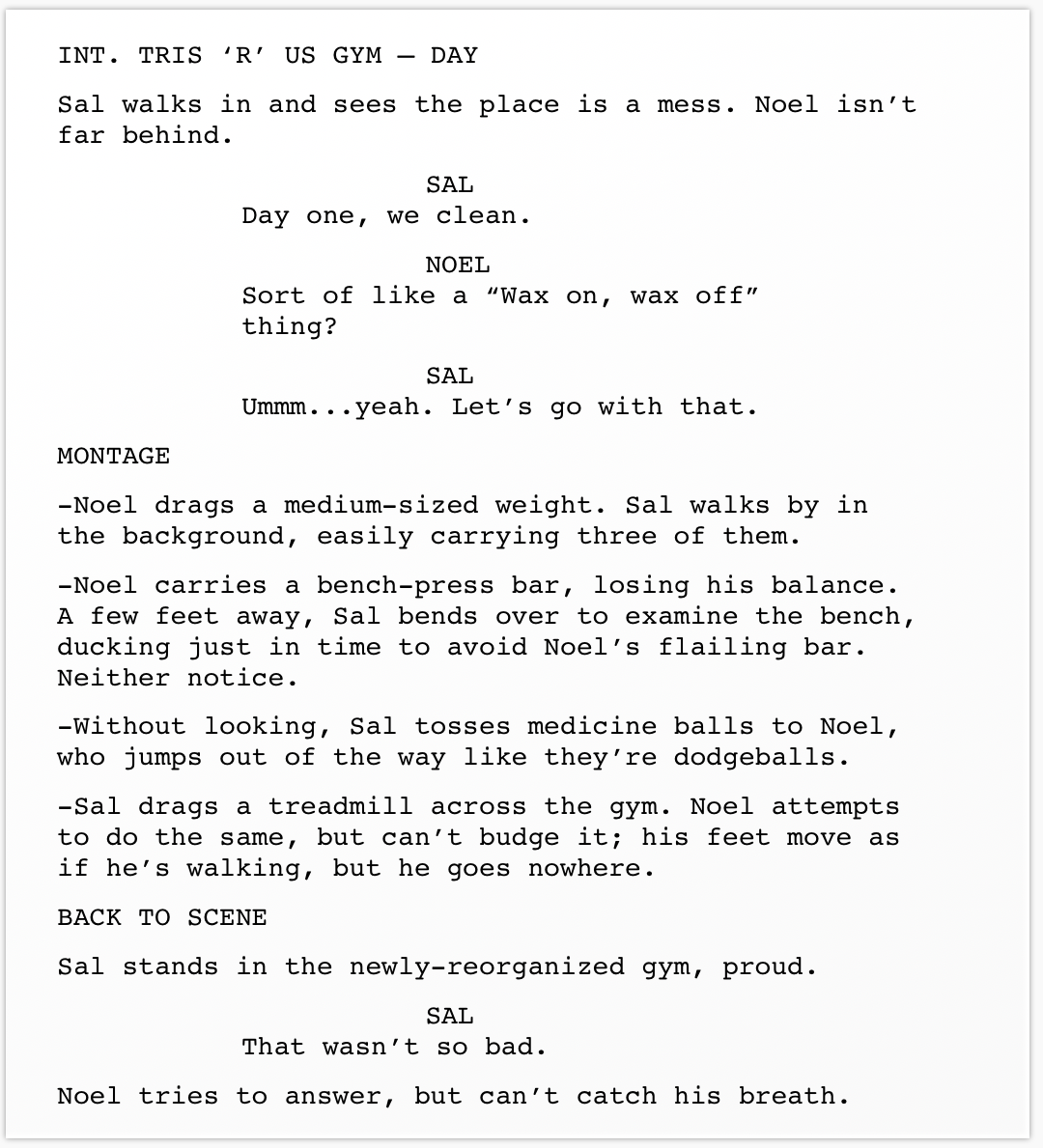
Montage in a Single Location
If the montage arises from a scene already in progress, slug MONTAGE, then list the elements of the montage — either as separate action lines, or as a bulleted list. When the montage is complete, slug either BACK TO SCENE, or END OF MONTAGE:
Montage in a New Location
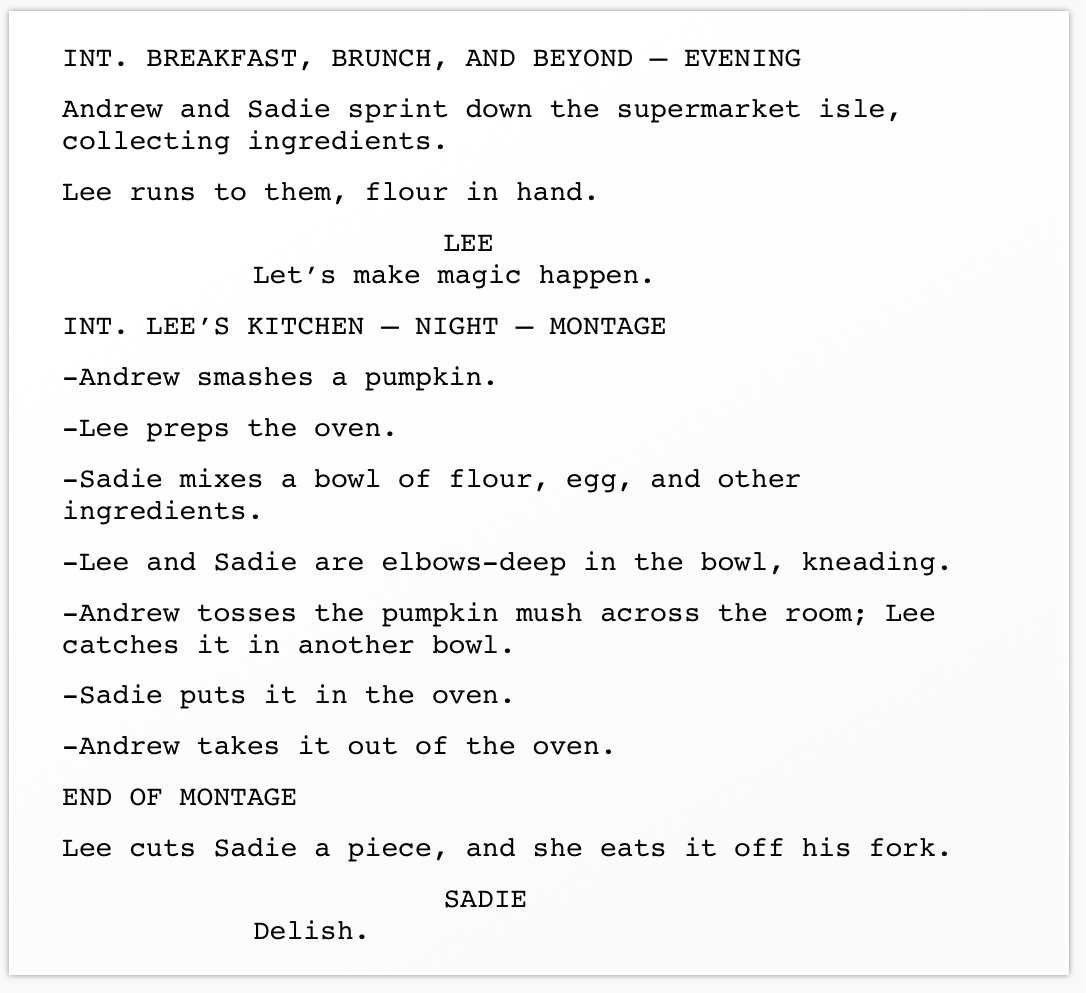
If the montage takes place in a different location than the previous scene, add MONTAGE to the scene header for the new scene. When the montage is finished, indicate END OF MONTAGE:
Montage in Multiple Locations
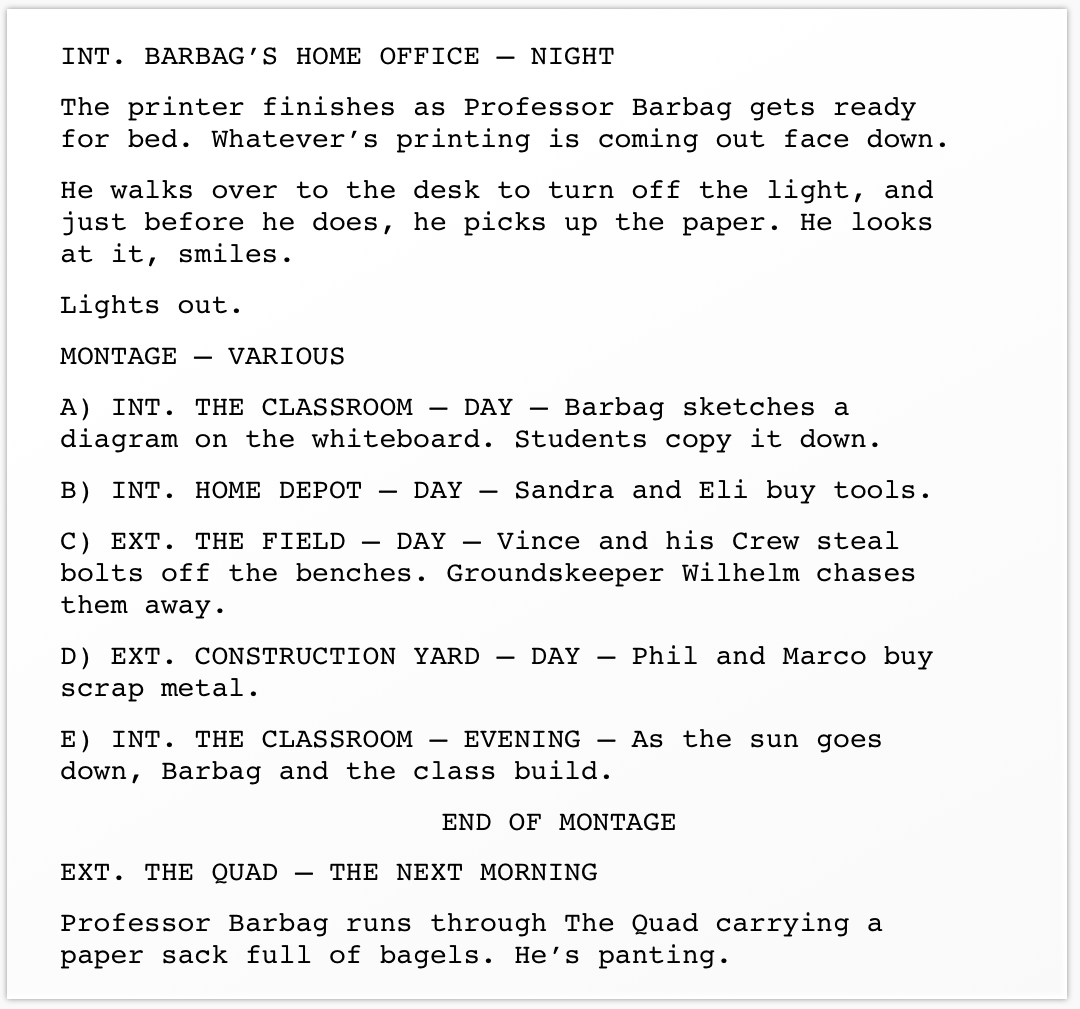
If the montage takes place in multiple locations, you can handle it a few ways. One simple way is to slug “MONTAGE – VARIOUS,” and then bullet or letter your list of montage elements, starting each with a slug line:
Some screenwriters are less specific about locations in montages, and don’t approximate scene headers:
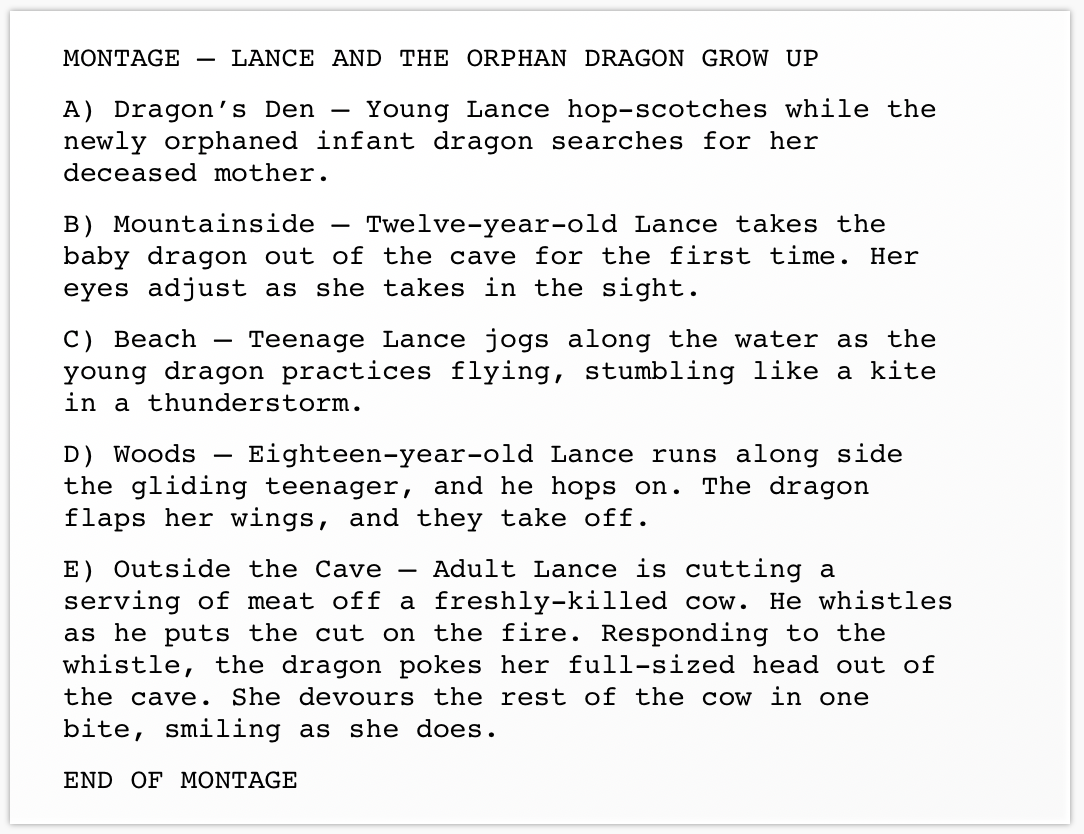
A third method for handling multiple locations is to slug each beat as its own short scene with a full scene heading, treating the montage essentially as a series of very short scenes. This is often the best choice when more than one meaningful thing happens within each location, or when the sequence includes dialogue. With this method you may choose not to indicate MONTAGE at all if the scenes are short enough and the structure clear enough, the montage will be self-evident to your reader.
When Should You Use a Montage in Your Screenplay?
Montages work best when you need to compress a significant passage of time or repetitive action into a short page count. The classic use cases are training sequences, falling-in-love sequences, and getting-ready-for-battle sequences — scenarios where showing every beat individually would be repetitive and would kill narrative momentum.
A few questions worth asking before writing a montage:
Does this sequence need to be shown at all? Just because a montage would help you cram a lot of shots into a sequence doesn't mean the audience needs that information. Do we really need a montage of your character doing the groceries or going through their morning routine? Are we learning necessary information about your character or the world they inhabit? If not, you're better off cutting it.
Is there a better scene hiding inside it? If one moment in your montage is more dramatically interesting than the others, consider whether that single moment deserves to be its own full scene rather than one beat in a sequence.
Does the sequence have an emotional arc? The best montages aren't just a list of things that happen, they build toward something. The character starts here emotionally and ends there. If you can't articulate that arc, the montage may not be earning its place in the script.
Frequently Asked Questions
Do you need to label a montage in a screenplay?
Generally, yes. Labeling it MONTAGE or MONTAGE – VARIOUS signals to the reader that the following beats should be read as a compressed sequence rather than individual full scenes. However, if you're treating each beat as its own short scene with full slug lines, the montage quality may be clear enough that no label is needed.
Can you have dialogue in a montage?
Yes! Though it's slightly less common. Montages are designed to compress time through action and image, so dialogue tends to slow them down and undercut the momentum you're trying to build. If a beat in your montage requires meaningful dialogue, consider whether it should be its own full scene instead.
How long should a montage be in a screenplay?
Most montages run one or fewer pages. Longer than that and the sequence starts to feel like it's stalling the story rather than advancing it. If your montage is running two or three pages, consider whether every beat is necessary or whether the sequence can be tightened.
What's the difference between BACK TO SCENE and END OF MONTAGE?
Both signal the end of a montage, but BACK TO SCENE implies the screenplay is returning to a scene that was already in progress when the montage began. END OF MONTAGE is more neutral and works in any context. Either is acceptable. The important thing is that you clearly signal to the reader that the montage is over.